

A website care plan is the monthly arrangement that starts after launch: you keep the site updated, backed up, monitored and fixed, and the client pays a fixed amount for it. Done well, it is the steadiest income a small studio can have, and the best way to stay close to a client. Done badly, it is unpaid support with a monthly invoice attached.
This guide covers what a plan should contain, the two ways to structure it, what to write down as out of scope, how to price it, and how to run it month after month without it eating your week.
Choose your model first: fixed tasks or a block of hours
Care plans come in two shapes, and mixing them up in one contract is where most disputes start.
| In practice | Fixed tasks (maintenance plan) | Block of hours (retainer) | Hybrid |
|---|---|---|---|
| The client buys | A routine: updates, backups, uptime checks, security scans, a report | Your availability: small changes, questions, content edits | The routine, plus an allowance for small changes |
| You track | That each task was done | Hours or money used against the allowance | Both, and which work draws down the allowance |
| Unused time | Does not apply | Expires at the end of the month, or rolls over up to a cap | Applies to the allowance only |
| Easy to explain | Yes | Needs a sentence on what counts | Needs a sentence on which work is in the routine |
| Fits | Sites that rarely change | Clients who send a steady trickle of requests | Most small business sites |
With a hybrid, say plainly which work draws down the allowance and which does not.
Whichever you pick, decide what happens to unused hours before the client asks. The two honest options are that unused time expires at the end of the month, or that it rolls over, ideally up to a cap. Silence on this point becomes an argument in month four.
What a care plan usually covers
Start from the work that keeps a site healthy and make each item something you can show you did.
- Updates. Core, plugins, themes and dependencies, applied on a staging copy first and tested before they reach production. Note anything you rolled back.
- Backups, with a restore test. A backup nobody has restored is a hope. Say how often backups run, where they are kept and that you test a restore on a schedule.
- Uptime and performance. An uptime monitor, a speed check on the main pages each month, and a look at the error logs.
- Security. Scans for vulnerable dependencies and malware, a review of user accounts and API keys, and removal of access nobody needs.
- Renewals. The domain, the SSL certificate, the hosting plan and any licences. An expired certificate or domain takes a site down just as surely as a bug, and it is entirely preventable.
- Small changes. Text edits, a new image, a menu change, a new page of a known type. Define "small" in hours or in task types.
- Support. A single place to ask for help, and a stated response time.
- A monthly report. What was updated, what was found, what it cost in hours and what you recommend next.
What to write down as not included
A plan is defined as much by its exclusions. Put these in writing, in the same document as the price.
- New features, redesigns and anything that needs a quote of its own.
- Content creation: writing pages, producing images, running the blog.
- Fixing damage caused by someone else with admin access, or by a plugin or service you did not install.
- Third-party costs: domain, hosting, premium plugins, email services. Say who pays and who renews.
- Emergency work outside agreed hours, unless you offer it at a stated rate.
- Recovering a site from before the plan began, when there were no backups to restore.
Response times: promise what you can keep
What clients value most in a care plan is knowing someone will answer. Higher tiers often differ mainly in how fast you respond, not in the technical work. Give a first-response target in business hours ("within one working day"), say when you work, and say what counts as urgent. Do not promise 24/7 unless you have staffed it.
How to price it
Pricing by the number of tasks undersells you, because the real product is that the site stays up and that someone is responsible. Price by what you take on instead.
- Responsibility. A brochure site that can be down for an afternoon is a different promise from a shop that takes orders every hour.
- Response time. Faster response costs you availability. Charge for it.
- Your real time. Count your monthly routine, your admin and your report, not only the visible tasks, and add a margin for the month when something goes wrong.
- Tiers by site, not by task. Two or three tiers (for example a basic site, a site with forms and bookings, a shop) are easier to sell than a menu of options.
Here is how that adds up for one tier. The rate is an example; use your own.
Price build-up: a site with forms and bookings
Example only, at €80 an hour. Your rate and hours will differ.
| Line | Basis | Per month |
|---|---|---|
| Monthly routine | 2.5 h at €80 | €200 |
| Report and admin | 1 h at €80 | €80 |
| Allowance for small changes | 2 h at €80 | €160 |
| Margin for the month that breaks | 20% of the above | €88 |
| Monthly fee | rounded | €530 |
First response within one working day. Work beyond the allowance at €80 an hour.
Minimum term three months, then one month’s notice.
Add an overage rate for work beyond the allowance, a start date, a minimum term (three or six months is common) and a notice period to end it. A plan with no end date and no price for extra work will drift.
Set up the monitoring once, then let it warn you
Most of a care plan is repetition, and repetition is where things slip. Keep one register per client with the domain and its registrar, hosting provider and plan, SSL certificate, CMS and version, licences, the renewal date of each and who pays. Then have something warn you before each date arrives, not after.
Check the register against the client every year. Renewals the client pays directly are the ones that get missed, because nobody on your side sees the reminder email.
Give clients one place to ask
The fastest way to lose money on a plan is for requests to arrive by email, text, chat and phone, so nobody can say how many were made or whether they fit the allowance. Choose one channel, such as a support address or a portal, tell the client at handover and answer only there. Each request becomes a record you can count against the allowance and report on.
The monthly report keeps the plan alive
A client whose site never breaks sees nothing for their money, which is the best outcome and the hardest to renew. A short monthly report fixes that. Keep it to one page:
Website care report: October 2026
Northwind Trading · northwind.co.uk · Plan: site with forms and bookings
1.Updates
- Core, 9 plugins and the theme, updated on staging, tested, then applied
- One plugin rolled back: its new version broke the booking form; we re-apply the fix release next month
2.Backups
- 31 daily backups, kept 90 days, stored off the server
- Restore test on 14 October: full site restored to staging in 18 minutes
3.Uptime and speed
| Measure | October | September |
|---|---|---|
| Uptime | 99.97% | 99.99% |
| Home page | 1.4 s | 1.6 s |
| Checkout | 2.9 s | 2.8 s |
4.Requests and hours
- 6 requests through the support address, all closed
- 3.5 of 4 hours used; the unused 0.5 h expires on 31 October
5.Recommendations for November
- Checkout is slow on phones (2.9 s). Lighter images and payment script: fixed fee €240
- The SSL certificate renews on 9 November. Nothing to do on your side
- Say what changed
List the updates, and what you rolled back and why. It shows the routine is real.
- Date the restore test
A dated restore is the line that proves the backups work.
- Compare with last month
Two columns make a trend; one number on its own means little.
- Count against the allowance
Requests from one channel, hours used of hours bought, and what happens to the rest.
- Recommend, with a price
This is where the next project comes from.
The recommendations are where plans grow. A report that says "the checkout is slow on phones; here is a fix for a fixed fee" turns maintenance into the next project.
Put it in a contract
A care plan needs a short written agreement: the services, the allowance and what happens to unused time, response times, exclusions, the fee and payment date, the term and how to end it. Our website maintenance agreement template and retainer agreement template are starting points, not legal advice, so have a professional review whatever you use.
Running a care plan in Rokn
In Rokn the plan lives on the client, next to everything else about them. This is how the pieces fit.
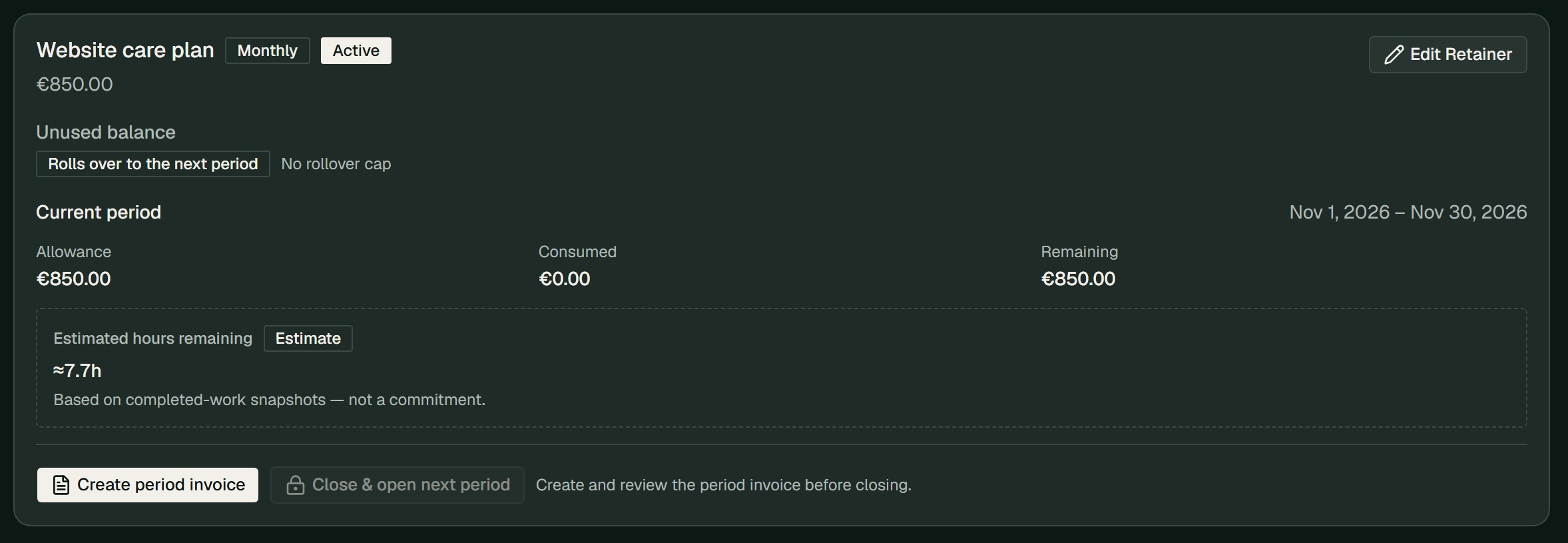
The fee and the cadence
The amount and how often a new period starts.
What happens to unused balance
It expires at the end of the period, or rolls over, with or without a cap.
The current period
Allowance, consumed and remaining. Billable time you log for the client draws it down.
Hours left, as an estimate
Worked out from completed work, and labelled as an estimate, not a commitment.
The period invoice
Create and review it, then close the period and open the next.
- A retainer on the client's page holds the fee, the cadence and what happens to the unused balance (expire, or roll over with an optional cap). It shows the current period, what has been used and what is left, and creates the period invoice when the period ends.
- The asset register holds domains, hosting, certificates and licences with their expiry dates. Rokn checks domains and certificates and warns you 30 and 7 days before they expire, and a client can approve a renewal from the portal (Business plan).
- Logins go in the client password vault, encrypted and logged on every reveal, instead of in a notes app (Business plan).
- Requests arrive in the help desk, by email or from the portal, with response targets you set in an SLA policy (email-to-ticket on Pro and Business; SLA policies on Business).
- Billable work you log for the client draws the retainer down, and the monthly routine can start from the "Monthly maintenance retainer" project starter.
- A recurring invoice bills fixed monthly amounts such as hosting.
- Expiry read from the public registry (RDAP)
- Certificate read from the site itself
| No. | Asset | Type | Client | Expires | Remaining |
|---|---|---|---|---|---|
| 1 | northwind.co.uk | Domain1 | Northwind Trading | 2026-11-21 | in 8 days |
| 2 | shop.northwind.co.uk | SSL certificate2 | Northwind Trading | 2026-12-02 | in 19 days |
| 3 | maisonclair.fr | Domain1 | Maison Clair | 2027-01-28 | in 76 days |
| 4 | Booking plugin licence | Licence | Maison Clair | 2026-11-05 | 8 days ago |
None of this requires Rokn. A spreadsheet of renewals, a password manager and a shared inbox will run a small plan. But once you look after more than a handful of sites, the cost of keeping those pieces in sync is the cost of the plan. Rokn keeps them on one client record. The next step is to set up a retainer for one client and see what it shows.
Bring the work together.
Start with one client project