

All Rokn features,
from first lead to paid invoice.
The work is connected; your tools should be too. Win the client, deliver the project, get paid and look after the client afterwards, all from the same record.
Five stages
Every feature,
by stage of the work.
Each card opens the feature’s page. A plan is named where a feature needs one.
01Win work
Find and win the client.
Clients and quotes on every plan.
02Deliver
Plan and do the work.
03Get paid
Invoice and collect.
On every plan, with no fee from Rokn.
04Look after the client
Keep the client and the site in good shape.
 Client portal & help deskA portal where clients follow the work, pay and sign, plus a help desk with response targets.
 Domain & SSL monitoringDomain and SSL expiry checks, renewals and costs for every client site you look after.Business plan
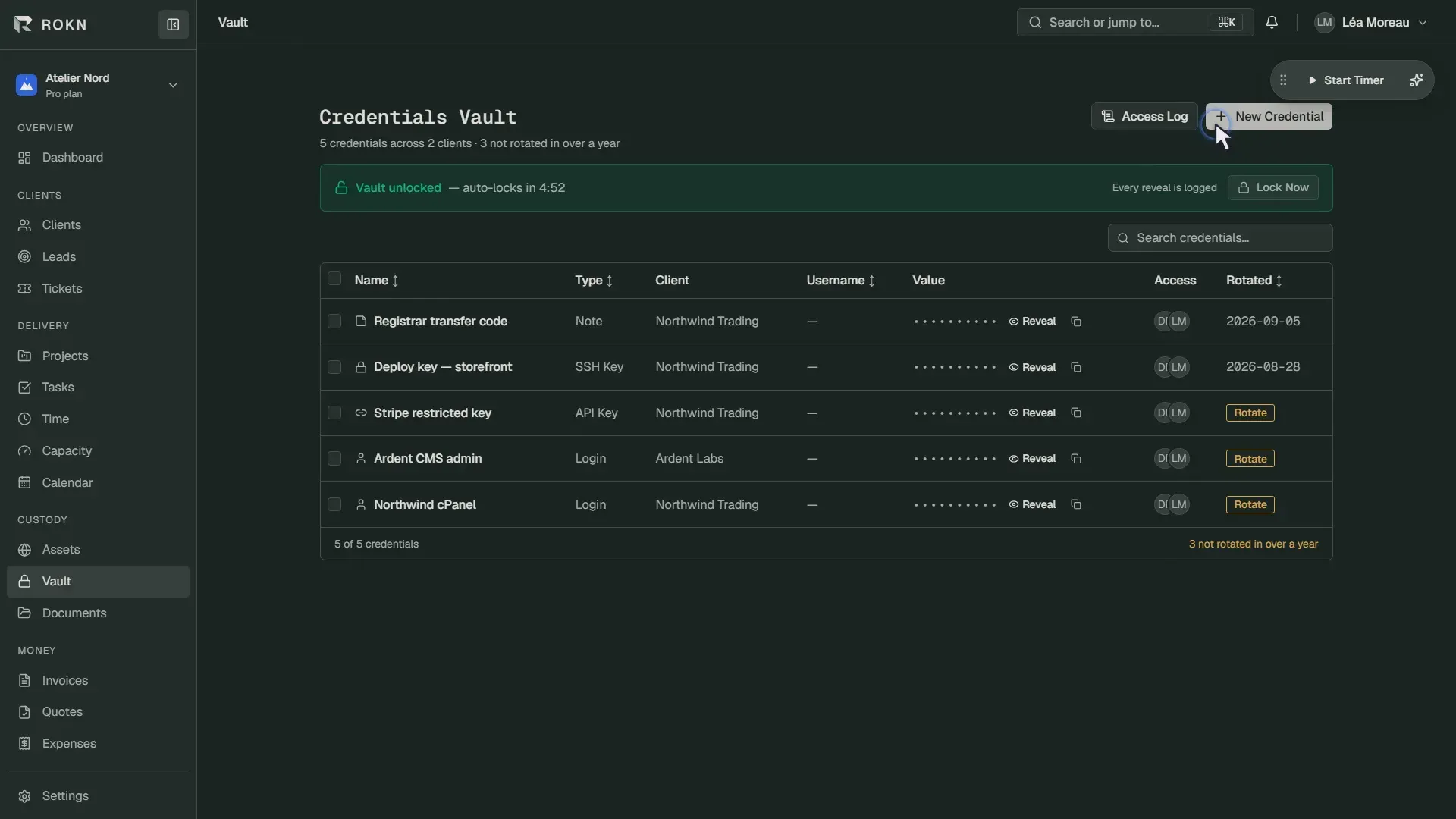 Client password vaultClient logins encrypted in one vault, shared in the portal, logged on every reveal.Business plan
05Run the business
Let the admin run itself.




Beyond CRM, projects and invoicing
Built for people who deliver
and maintain digital work.
The parts other tools leave to a spreadsheet, in eight languages and 155 currencies.
- Domain & SSL monitoring: expiry read from the registry, alerts 30 and 7 days before. Business plan.
- Expiry read from the public registry (RDAP)
- Certificate read from the site itself
No. Asset Type Client Expires Remaining 1 shop.northwind.co.uk SSL certificate2 Northwind Trading 2026-10-10 in 12 days 2 northwind.co.uk Domain1 Northwind Trading 2026-10-15 in 17 days 3 harborview.org Domain1 Harborview Trust 2026-10-25 in 27 days 4 mail.crestline.fr SSL certificate2 Crestline SAS 2026-11-16 in 49 days - Client password vault: revealed only after your password, every reveal logged. Business plan.
- Northwind cPanel
- Username: admin@northwind.co.uk
- Password
demo·k7Q-not-a-real-password
Access log
- Léa MoreaurevealedNorthwind cPanel10:42
- Sam OrtizcopiedNorthwind cPanelYesterday, 16:05
- Léa MoreaucopiedNorthwind cPanel3 Nov, 09:20
- GitHub issue sync: title, state and assignee kept in step both ways.
northwind/storefront #142
TaskStorefront rebuild
IssueCheckout button overlaps the cart total on mobiletitleTaskCheckout button overlaps the cart total on mobileStatusOpenopen / closedStatusIn progressAssignee@lea-moreauassigneeAssigneeLéa Moreau
What Rokn does while you work
Set the rules once.
Rokn follows them every day.
Tuesday
- 07:00Invoicing & payments
Reminder sentINV-2026-0184 · Northwind Trading · 3 days overdue
Rule: reminders before and after the due date, in the client’s language
- 07:05Invoicing & payments
Recurring invoice issuedINV-2026-0191 · Harborview Trust · monthly care plan
Rule: created on schedule, sent to the client if you allow it
- 07:10Invoicing & payments
Recurring expense recordedHosting · added on its date
Rule: subscriptions and regular costs added on their dates
- 07:30Domain & SSL monitoring
Expiry alertshop.northwind.co.uk · SSL certificate · 7 days left
Rule: alerts 30 and 7 days before an expiry
- 08:00CRM
Date reminderCrestline SAS · contract renewal comes due
Rule: any date field you add reminds you before it comes due
- 09:12File sharing & documents
Upload scannedbrief-v3.pdf · clean · now open to the team
Rule: every upload and emailed attachment checked for viruses first
- 10:40Client portal & help desk
Response target warningTicket #318 · first response target close
Rule: the team is warned before a ticket misses its target
- 11:15Project management
GitHub syncednorthwind/storefront #142 closed · task Done
Rule: titles, states and assignees matched in both directions
- 13:02CRM
Signer remindedWebsite care agreement · 1 of 2 signed
Rule: signers who haven’t signed get a reminder
- 14:20Client portal & help desk
Survey sentTicket #311 resolved · satisfaction survey
Rule: sent after a ticket is resolved; a poor score can create a follow-up task
- 16:00CRM
Stalled lead flaggedHarborview redesign · too long in Proposal
Rule: the owner hears once when a lead stays in a stage too long
- 17:30CRM
Bounces recordedAutumn newsletter · 2 bounced addresses left out next time
Rule: opens, clicks and bounces recorded
Start the day, find anything.
The dashboard that opens the day, and search across every record.
Questions about the features.
Is every feature on every plan?
No. Some features are part of Pro or Business. The pricing page lists what each plan includes.
Can I use only part of Rokn?
Yes. Start with clients and invoices, for example, and use projects, the portal or the help desk when you need them. Everything you add connects to the same client records.
What does Rokn connect to?
GitHub, Google Calendar, Microsoft 365 and any calendar app by ICS link, Stripe, PayPal, S3-compatible storage, your own email domain, Claude and other AI clients through MCP, plus a REST API and webhooks. There is no Slack, Zapier, QuickBooks or Xero integration.
Can I bring my existing data?
Import your clients from a CSV file. Other records can be created through the API, or by an AI agent connected over MCP.
Try it on one
real client.
Add a client, send a quote and see how the rest follows from it.