

Checked 13 November 2026
Rokn vs Notion as a CRM:
the client system, already built.
In Notion you build the CRM, invoices and client pages from templates. In Rokn quotes, time, invoices, payments and a client portal come ready and connected.
Ready for invoicing
Quotes, deposit invoices, time, retainers, tax and card payments are built in and connected to each client. In Notion they are templates you wire up yourself.
Clients without Notion accounts
Clients approve quotes, pay invoices and sign contracts in Rokn from a link, without an account. In Notion a client is a guest who needs their own Notion login.
Flat price, invoicing included
Notion Plus is billed per person, €34.50 a month for three billed monthly, and still has no invoicing. Rokn Pro is one flat price for up to five.
Feature by feature,
checked on Notion's own pages.
Twenty things a client business runs on. Rokn's notes say where a feature needs Pro or Business. "Not found in their docs" means we searched Notion's pricing page and help centre and found nothing.
15 differences · 20 features compared
| Feature | Rokn | Notion |
|---|---|---|
| Win work | ||
| Quotes and proposals with online approval | IncludedThe client approves from a link by typing their name. All plans. | Not found in their docs12No native quotes with approval found; templates only. |
| Contracts with e-signature | IncludedThe signer confirms with an emailed code. Pro and Business. | Not found in their docs12No native e-signature found; only third-party connections. |
| CRM and sales pipeline | IncludedLeads on a board, converted to a client in one step. Pro and Business. | Partly6Build your own on databases; the gallery lists 3,135 CRM templates. |
| Deliver | ||
| Projects and tasks | IncludedBoards, subtasks and task dependencies. All plans. | Included1Databases with subtasks, dependencies and custom properties. |
| Time tracking | IncludedManual entries on all plans, the live timer on Pro and Business. Billable rates and rounding. | Not found in their docs12No native time tracking found; templates only. |
| Expenses | IncludedBillable and recurring expenses, supplier bills. | Not found in their docs12No native expense tracking found; templates only. |
| Retainers | IncludedA prepaid balance per client, with period invoices. | Not found in their docs12No retainer feature found. |
| Get paid | ||
| Invoicing: recurring, deposits, credit notes, reminders | IncludedAll four, on one record shared with quotes, time and payments. | Partly7Invoicing is by marketplace template; the help article covers only your own Notion bill. |
| Card payments on your own account, no platform fee | IncludedCards go through your own Stripe account, PayPal through your own PayPal account, and Rokn adds no fee. Bank transfers are recorded by hand. | Not found in their docs12No client payments feature documented. |
| Multi-currency invoices and VAT with reverse charge | IncludedInvoice currency per client; reverse charge for any country; VAT exemption defaults for the EU, EEA and UK. | Not found in their docs12No tax or VAT handling for client invoices documented. |
| Client-facing | ||
| Client portal | IncludedClients see projects, invoices, tickets and documents; you choose the sections per client. | Partly4Clients are invited as guests and need their own Notion account. |
| Help desk with SLA targets and CSAT | IncludedTickets on all plans; email-to-ticket and satisfaction surveys on Pro and Business; SLA targets on Business. | Not found in their docs12No help desk with SLA found. |
| Client sites | ||
| Domain and SSL expiry monitoring | IncludedDomain registration and SSL certificates checked for every client site. Business plan. | Not found in their docs12Not found on the pricing page or in the help centre. |
| Encrypted client password vault | IncludedEncrypted at rest, shared per client, every reveal logged. Business plan. | Not found in their docs12Not found on the pricing page or in the help centre. |
| GitHub issue sync | IncludedTwo-way sync of title, open or closed state and assignee. All plans. | Partly11One-way GitHub sync into a database, read-only in Notion, on the Business plan. |
| Platform and AI | ||
| Languages including Arabic (right-to-left) | IncludedEight: English, Chinese, Spanish, Arabic, French, Portuguese, Hindi and German. Arabic reads right to left. | Included222 interface languages including Arabic and Hebrew. |
| Choice of where files are stored | IncludedManaged storage in the EU or the US, or your own S3-compatible bucket. | Partly3US by default; EU, Japan or Korea residency only on Enterprise. |
| REST API and signed webhooks | IncludedREST API with keys and OAuth, signed webhooks with retries. Business plan. | Included8Public API and webhooks. |
| MCP server for AI tools | IncludedClaude and other MCP clients act with the permissions of the person who connected. Business plan. | Included9Official Notion MCP. |
| Built-in AI assistant | IncludedWorks across clients, projects and invoices and asks before it writes. Monthly credits on paid plans. | Included1Notion AI and agents; credits on top of the plan. |
Checked Nov 13, 2026
Sources (12)
- Notion pricing · Checked Nov 13, 2026
- Notion: change your language · Checked Nov 12, 2026
- Notion: data residency · Checked Nov 12, 2026
- Notion: members and guests · Checked Nov 12, 2026
- Notion: invoices (your own Notion bill) · Checked Nov 12, 2026
- Notion CRM templates · Checked Nov 12, 2026
- Notion invoicing templates · Checked Nov 12, 2026
- Notion developers (API and webhooks) · Checked Nov 12, 2026
- Notion MCP · Checked Nov 12, 2026
- Notion: export your content · Checked Nov 13, 2026
- Notion: connect GitHub · Checked Nov 13, 2026
- Notion help centre and pricing (searched for each feature) · Checked Nov 12, 2026
What you'd pay
for the same team.
Rokn is a flat price for the workspace, not per person. Solo shows Rokn Free: quotes, projects, tasks, invoices and time. Notion lists its prices in euros.
Solo
1 person
Rokn FreeSave €11.50 / month
€0EUR/ month
Team members: 1
Notion Plus
€11.50EUR/ month1
€11.50 per person × 1 · Billed monthly; €9.50 billed yearly. A free plan exists for personal use.
3-person studio
3 people
Rokn ProSave €15.50 / month
€19EUR/ month
Team members: 5
Notion Plus
€34.50EUR/ month1
€11.50 per person × 3 · Billed monthly; €9.50 per person billed yearly. GitHub sync needs Business at €23.50.
8-person agency
8 people
Rokn BusinessSave €43 / month
€49EUR/ month
Team members: Unlimited
Notion Plus
€92EUR/ month1
€11.50 per person × 8 · Billed monthly; €9.50 per person billed yearly. Notion AI agents cost extra.
Prices as of Nov 13, 2026. Taxes excluded. See full pricing
Sources (1)
- Notion pricing · Checked Nov 13, 2026
Where Rokn pulls ahead
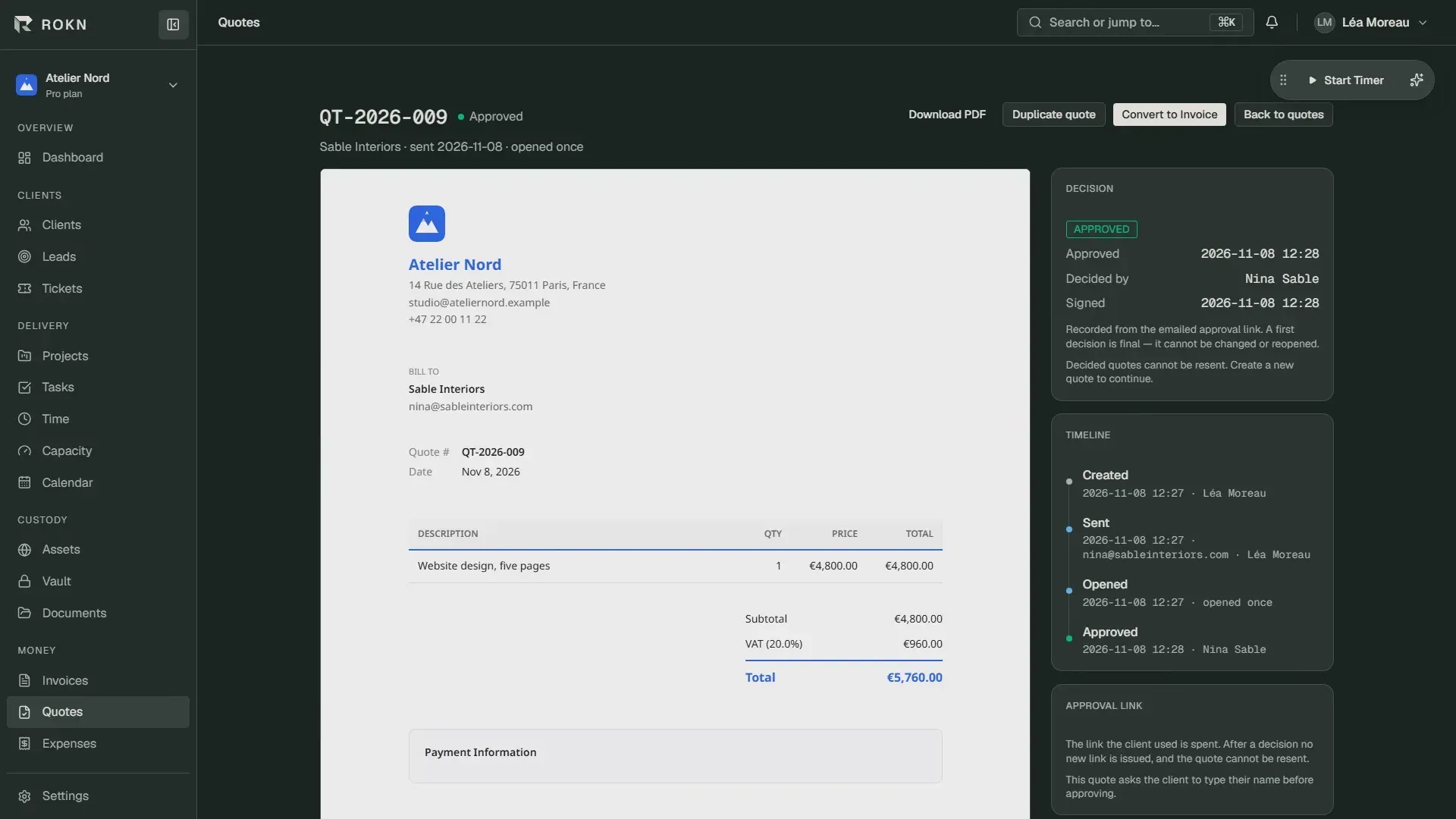
Quotes your client approves
with a typed signature.
The client reads the scope, types their name to approve, and Rokn records who decided and when. Convert the approved quote into an invoice in one click. On every plan.
Invoices that know
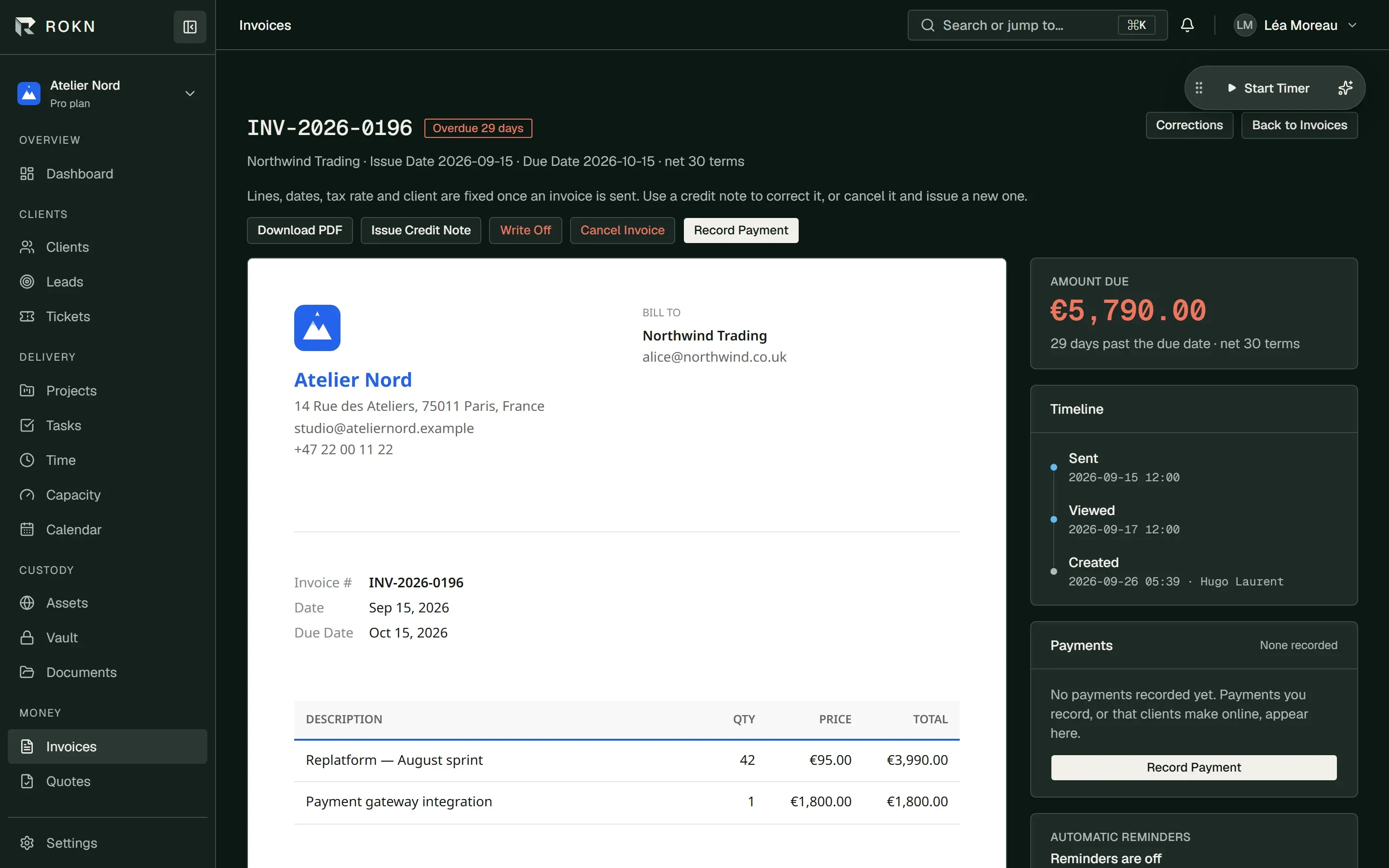
what is outstanding.
No formulas to build: Rokn shows what is outstanding, what is overdue, what was paid this month and how long clients take to pay, across every invoice.
Clients get a portal,
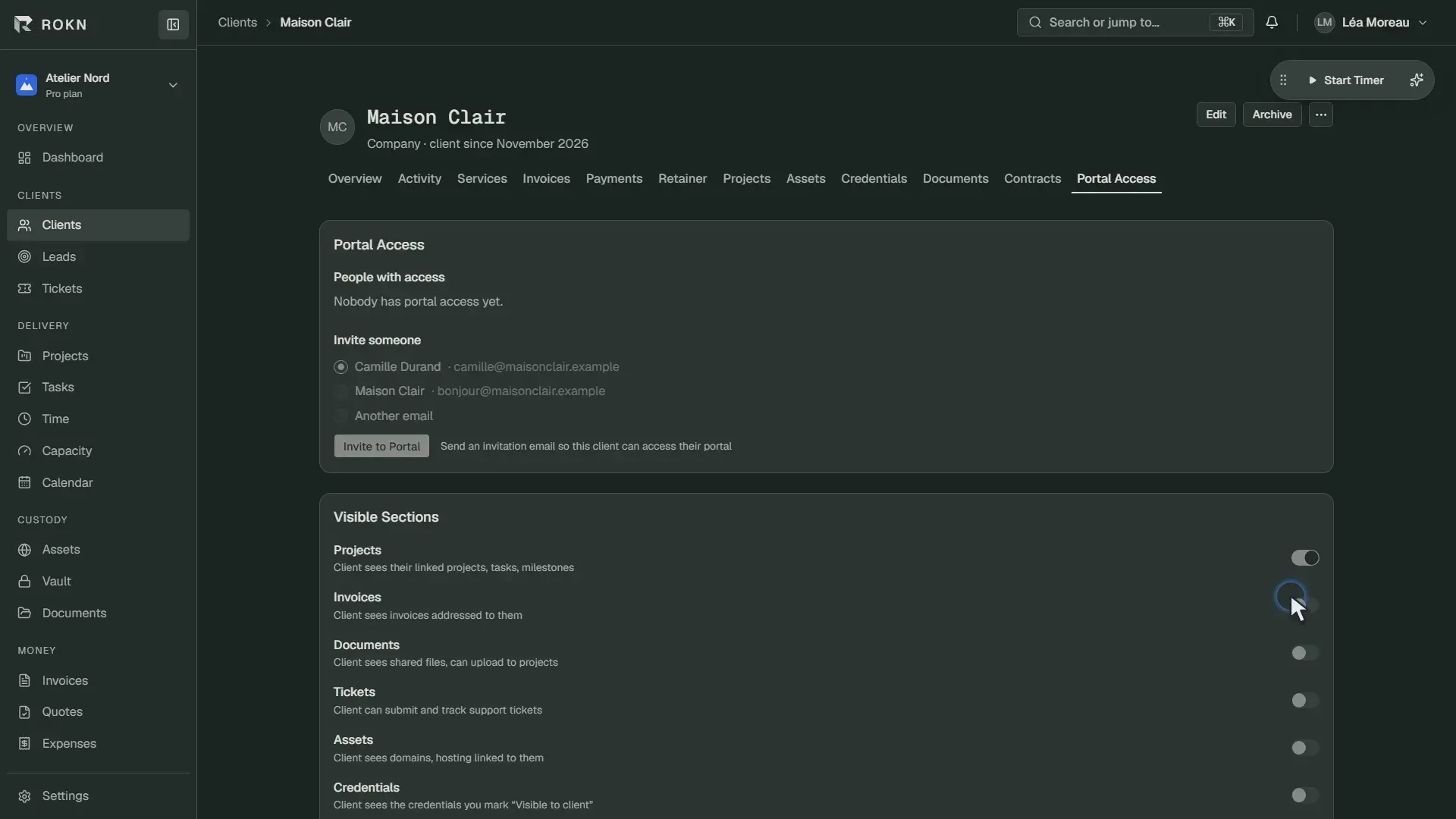
not a Notion invite.
Invite a client’s contacts to their portal and choose what they see: projects, invoices, documents, tickets, assets and shared logins. They pay, approve and sign from links without an account.
See it working.
Short tutorials from the product.
Real Rokn screens, a few minutes each, with subtitles.
Good to know before you switch
Structured records, not a blank page
WorkaroundAdd your own fields to clients, contacts, leads, projects and tasks.
Eight interface languages, against 22 in Notion
Not plannedThe Rokn mobile app is in development
On the roadmapThe web app works in a phone browser.
NotionRoknAbout an hour for a client list
Move your clients over,
keep your old work finishing.
Clients come across in a CSV. Allow a day or two if you also rebuild project and invoice records by hand.
Export your client database from Notion
Open the database in a Table view, choose the three-dot menu, then Export, and pick Markdown & CSV. Notion downloads a zip with the CSV inside.
Notion’s export guideTidy the columns, then import into Rokn
Rename the columns to name, email, phone, website, address, VAT ID and currency. In Clients, choose Import from CSV. Rokn matches common column names (name, email, phone, website, address, VAT ID, currency) and takes up to 500 rows at a time. Imported clients count toward your plan, so a long list needs Business.
Import clients from a CSV fileStart new work in Rokn
Create new quotes, projects and invoices in Rokn. Let open projects and unpaid invoices finish where they are, then close the old account.
Comes across
- Clients: names, emails, phones, websites, addresses and VAT IDs from your database
Stays behind
- Pages, notes and wiki content: keep them in Notion or upload exports to Rokn Documents
- Template-based invoices, time logs and project databases: recreate the live ones
- Formulas, relations and views: these do not carry over
Rokn vs Notion: questions
Can I keep Notion for docs and use Rokn for clients?
Yes. Many people keep their wiki and notes in Notion and run clients, projects and invoices in Rokn.
Can I move my Notion CRM into Rokn?
Yes. Export your client database to CSV and import it into Rokn. Add your own fields for anything extra.
Why not build it all in Notion?
You can for light needs. The cost comes when invoices, time, support and permissions have to be built and kept in step by hand. In Rokn they are connected from the start.
Does Rokn have custom fields?
Yes, on clients, contacts, leads, projects and tasks, usable as columns and filters.
Something out of date? Tell us and we will fix it.
Email hello@rokn.devKeep Notion for notes. Run your clients in Rokn.
Start free, import a few clients and run one project from quote to paid invoice.