

Checked 13 November 2026
Rokn vs Bonsai:
proposal to paid, and everything after.
Both take a client from proposal to paid invoice. Rokn also runs the support, client sites and passwords that come after, with no platform fee on your card payments.
Support and client sites, built in
Help desk with SLAs, domain and SSL monitoring, a client password vault and GitHub sync sit next to the invoices. We could not find any of these in Bonsai.
No fee on your card payments
Bonsai adds a 1% platform fee when you use your own Stripe or PayPal, plus 2.5% on foreign-currency invoices. Rokn sends payments to your own Stripe or PayPal account and adds nothing.
One price for the team
Bonsai Essentials is priced per user: $75 a month for three people, billed monthly. Rokn is one flat price for the workspace.
Feature by feature,
checked on Bonsai's own pages.
Twenty things a client business runs on. Rokn's notes say where a feature needs Pro or Business. "Not found in their docs" means we searched Bonsai's pricing page and help centre and found nothing.
10 differences · 20 features compared
| Feature | Rokn | Bonsai |
|---|---|---|
| Win work | ||
| Quotes and proposals with online approval | IncludedThe client approves from a link by typing their name. All plans. | Included1Proposals on Essentials and up. |
| Contracts with e-signature | IncludedThe signer confirms with an emailed code. Pro and Business. | Included5Legally binding e-signatures, Essentials and up. |
| CRM and sales pipeline | IncludedLeads on a board, converted to a client in one step. Pro and Business. | Included1CRM on every plan; deals pipeline on Premium. |
| Deliver | ||
| Projects and tasks | IncludedBoards, subtasks and task dependencies. All plans. | Included1Tasks and unlimited projects on every plan; Gantt on Premium. |
| Time tracking | IncludedManual entries on all plans, the live timer on Pro and Business. Billable rates and rounding. | Included1Time tracking on every plan. |
| Expenses | IncludedBillable and recurring expenses, supplier bills. | Included1Expense tracking on Essentials and up. |
| Retainers | IncludedA prepaid balance per client, with period invoices. | Included6Retainer is a project billing type with a recurring fee. |
| Get paid | ||
| Invoicing: recurring, deposits, credit notes, reminders | IncludedAll four, on one record shared with quotes, time and payments. | Included1Invoices and payments on Essentials and up. |
| Card payments on your own account, no platform fee | IncludedCards go through your own Stripe account, PayPal through your own PayPal account, and Rokn adds no fee. Bank transfers are recorded by hand. | Partly3Using Stripe or PayPal instead of Bonsai Payments adds a 1% platform fee where Bonsai Payments is available. |
| Multi-currency invoices and VAT with reverse charge | IncludedInvoice currency per client; reverse charge for any country; VAT exemption defaults for the EU, EEA and UK. | Partly7Over 100 currencies, with a 2.5% FX fee on cross-currency invoices. A default tax rate per invoice; we found no reverse charge in the help centre. |
| Client-facing | ||
| Client portal | IncludedClients see projects, invoices, tickets and documents; you choose the sections per client. | Included2Invoices, files, project activity and messages, Essentials and up. |
| Help desk with SLA targets and CSAT | IncludedTickets on all plans; email-to-ticket and satisfaction surveys on Pro and Business; SLA targets on Business. | Not found in their docs12Not on the pricing page or in any of the 216 help-centre articles we searched. |
| Client sites | ||
| Domain and SSL expiry monitoring | IncludedDomain registration and SSL certificates checked for every client site. Business plan. | Not found in their docs12Not on the pricing page or in the help centre. |
| Encrypted client password vault | IncludedEncrypted at rest, shared per client, every reveal logged. Business plan. | Not found in their docs12Not on the pricing page or in the help centre. |
| GitHub issue sync | IncludedTwo-way sync of title, open or closed state and assignee. All plans. | Not found in their docs4The integrations list (QuickBooks, Xero, Zapier, Calendly, Zoom and others) has no GitHub. |
| Platform and AI | ||
| Languages including Arabic (right-to-left) | IncludedEight: English, Chinese, Spanish, Arabic, French, Portuguese, Hindi and German. Arabic reads right to left. | Not found in their docs12No language setting found in the help centre, which is in English only. |
| Choice of where files are stored | IncludedManaged storage in the EU or the US, or your own S3-compatible bucket. | Hosting providers listed on the trust centre are in the United States.8 |
| REST API and signed webhooks | IncludedREST API with keys and OAuth, signed webhooks with retries. Business plan. | Partly9REST API with API key or OAuth. We found no first-party webhooks; events go through Zapier. |
| MCP server for AI tools | IncludedClaude and other MCP clients act with the permissions of the person who connected. Business plan. | Included10Official Bonsai MCP server. |
| Built-in AI assistant | IncludedWorks across clients, projects and invoices and asks before it writes. Monthly credits on paid plans. | Partly14Bonsai AI drafts documents, in the US, UK and Canada only. |
Checked Nov 13, 2026
Sources (14)
- Bonsai pricing · Checked Nov 13, 2026
- Bonsai: how to use the client portal · Checked Nov 12, 2026
- Bonsai: online payment methods and fees · Checked Nov 12, 2026
- Bonsai: integrations collection · Checked Nov 12, 2026
- Bonsai contracts (Zoom product page) · Checked Nov 12, 2026
- Bonsai: project billing types · Checked Nov 12, 2026
- Bonsai: supported currencies · Checked Nov 12, 2026
- Bonsai trust centre: sub-processors · Checked Nov 12, 2026
- Bonsai API documentation · Checked Nov 12, 2026
- Bonsai MCP server · Checked Nov 12, 2026
- Bonsai: export your account data · Checked Nov 13, 2026
- Bonsai help centre (216 articles searched) · Checked Nov 12, 2026
- Zoom: Zoom acquires Bonsai · Checked Nov 12, 2026
- Bonsai AI documents · Checked Nov 12, 2026
What you'd pay
for the same team.
Rokn is a flat price for the workspace, not per person. Solo shows Pro, which has contracts and the pipeline; a Free plan exists too.
Solo
1 person
Rokn Pro
€19EUR/ month
Team members: 5
Bonsai Essentials
$25USD/ month1
Billed in USD
$25 per person × 1 · Billed monthly; $19 per user billed yearly. Essentials is the cheapest Bonsai plan with invoices, contracts and the client portal.
3-person studio
3 people
Rokn Pro
€19EUR/ month
Team members: 5
Bonsai Essentials
$75USD/ month1
Billed in USD
$25 per person × 3 · Billed monthly; $19 per user billed yearly.
8-person agency
8 people
Rokn Business
€49EUR/ month
Team members: Unlimited
Bonsai Essentials
$200USD/ month1
Billed in USD
$25 per person × 8 · Billed monthly; $19 per user billed yearly.
Prices as of Nov 13, 2026. Taxes excluded. See full pricing
Sources (1)
- Bonsai pricing · Checked Nov 13, 2026
Where Rokn pulls ahead
Support lives next to the invoices,
not in a separate inbox.
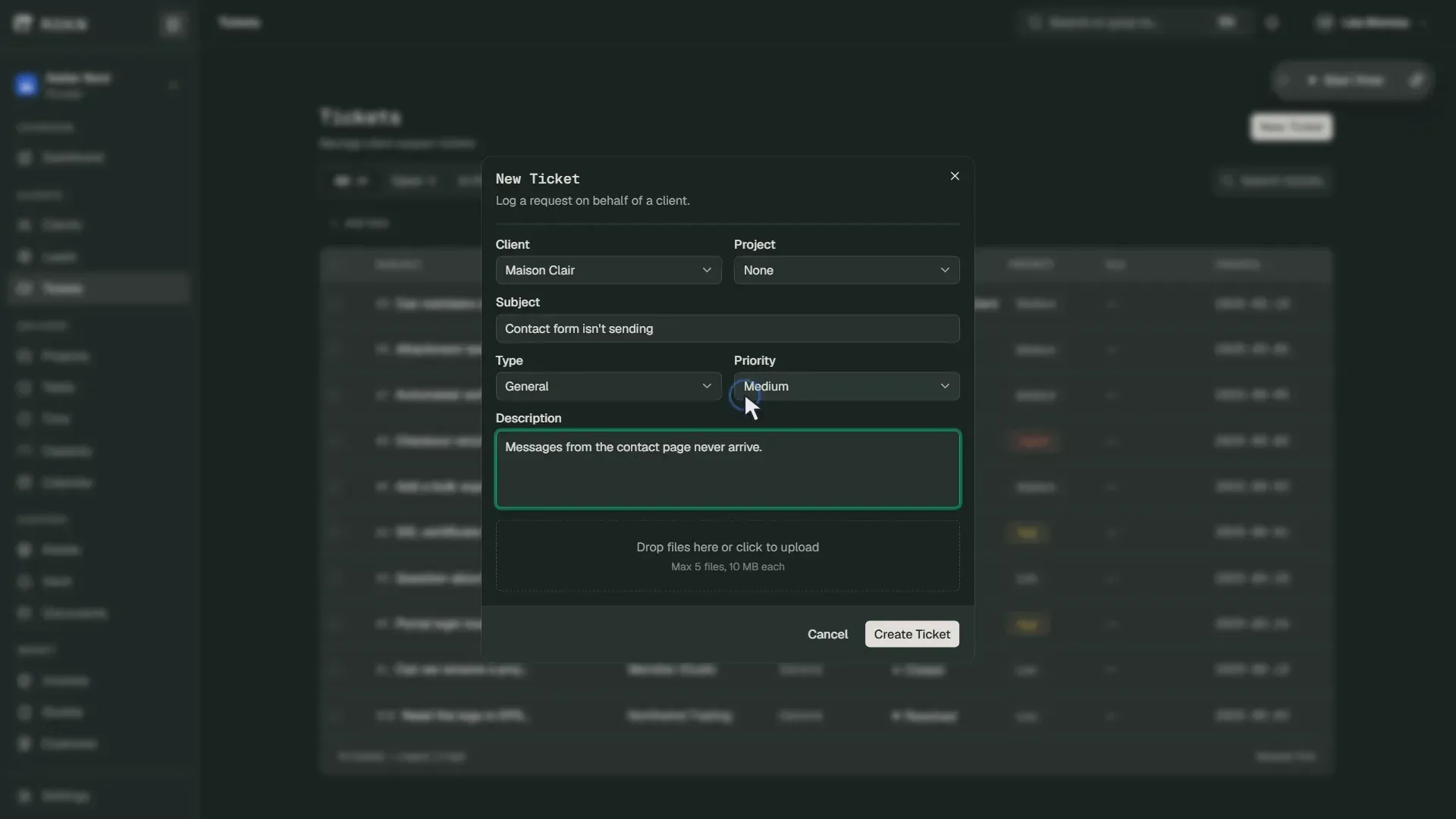
Clients raise tickets from the portal or by email, and you can log one for them in a few fields. Set SLA targets per priority, get a warning before one is missed, and send a satisfaction survey when a ticket closes. Email-to-ticket and surveys come with Pro and Business; SLAs with Business.
Client domains and certificates,
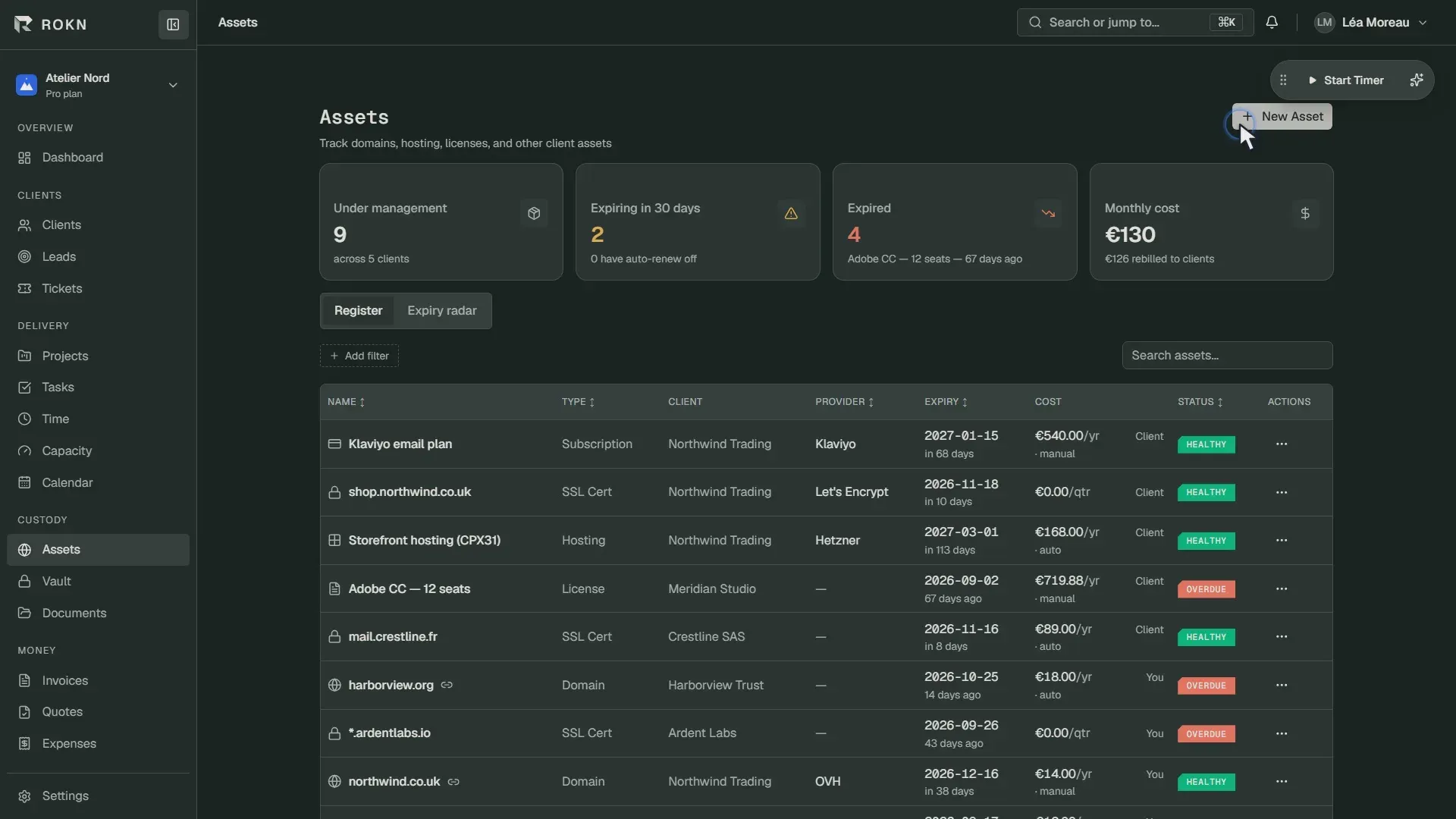
watched for you.
Domains, SSL certificates, hosting and licences sit in one register with their client, provider, cost and expiry, and Rokn warns you before anything lapses. Logins for those sites sit in an encrypted vault. Both come with Business.
Payments on your own Stripe or PayPal.
No Rokn fee on top.
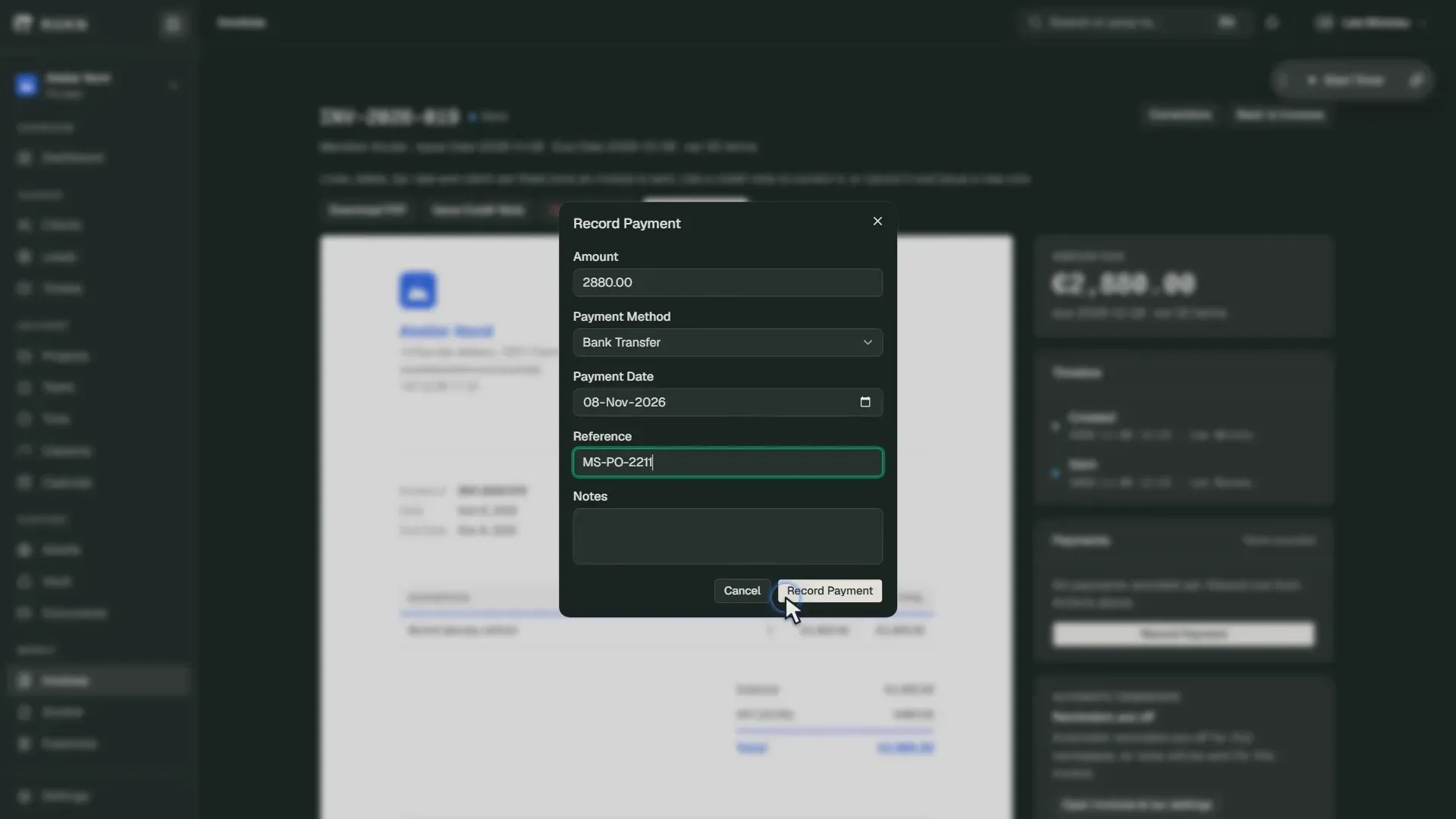
Clients pay an invoice from a link, by card through your own Stripe account or with your own PayPal; the provider charges its usual fee and Rokn adds nothing. A bank transfer is recorded against the invoice with its date and reference.
See it working.
Short tutorials from the product.
Real Rokn screens, a few minutes each, with subtitles.
Good to know before you switch
The Rokn mobile app is in development
On the roadmapThe web app works in a phone browser.
No QuickBooks or Xero sync
WorkaroundExport invoices and reports as CSV or PDF for your accountant.
Payments through your own Stripe or PayPal account; no ACH bank debits
WorkaroundRecord bank transfers against the invoice by hand.
BonsaiRoknAbout an hour for clients
Move your clients over,
keep your old work finishing.
Clients come across in a CSV. Plan a few days to rebuild templates while old and new run side by side.
Export your clients from Bonsai
In Company Settings, open Data and download the Companies CSV. Bonsai exports one data type at a time, so take the others you want to keep too.
Bonsai’s export guideImport the clients into Rokn
In Clients, choose Import from CSV. Rokn matches common column names (name, email, phone, website, address, VAT ID, currency) and takes up to 500 rows at a time. Imported clients count toward your plan, so a long list needs Business.
Import clients from a CSV fileStart new work in Rokn
Create new quotes, projects and invoices in Rokn. Let open projects and unpaid invoices finish where they are, then close the old account.
Comes across
- Clients: names, emails, phones, websites, addresses, VAT IDs and currency, from the Companies CSV
Stays behind
- Invoice history, signed contracts and old quotes: keep their PDFs and upload them to Rokn Documents for the record
- Projects, tasks and time entries: Rokn has no importer for these, so recreate the live ones
- Templates, automations and integrations: rebuild them in Rokn
Rokn vs Bonsai: questions
Can I move from Bonsai to Rokn?
Yes. Export the Companies CSV from Bonsai and import it in Clients, then run new work in Rokn while old projects finish. There is no one-click Bonsai import.
Does Rokn have a time tracker and retainers like Bonsai?
Yes. Log time on any plan, run the live timer on Pro and Business, and turn billable hours into invoice lines without billing them twice. Retainers hold a prepaid balance per client with period invoices.
Does Rokn take a fee on card payments?
No. Clients pay by card through your own Stripe account or with your own PayPal. The provider charges its usual fee; Rokn adds nothing on top.
Is Bonsai still its own product after the Zoom deal?
Yes. Zoom's announcement says Bonsai remains a standalone platform with its brand.
Something out of date? Tell us and we will fix it.
Email hello@rokn.devRun your next client from lead to paid invoice in Rokn.
Start free, import a few clients and run one project from quote to paid invoice.